
Apollo has forum-like project messages!
Apollo is all about team communication. The principle is simple: free flowing communication is more important than having somebody with a whip who knows how late everything is. Each project in Apollo has a very important "Messages" section, where communication about the project itself should ideally happen. Implementing reply-by-mail in Apollo has already made a difference to thousands of teams. Well, we went one step further: we turned our project "messages" section into something that can work more like a "forum".
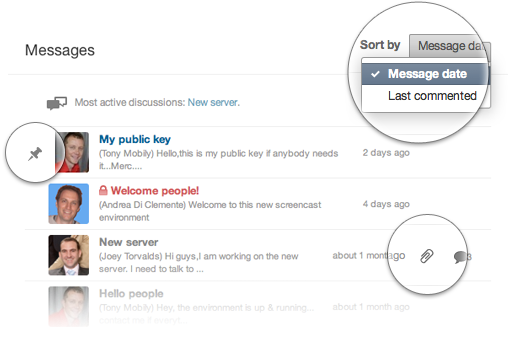
First of all, the overview itself has changed: you now get a list of messages, with the name and photo of the poster as well as the usual information like the post's blurb, date and the attachment icon (if there are attachments).
However, there are some important improvements here. First of all, you can now "pin" a post. This means that that post will always stay on top of the list. This is very handy for welcome messages, for example, or for repositories of information that is always valid for the project.
You can also order the messages so that the one that was the most recent comment comes on top. Adding a comment "bumps" a post right up, keeping discussions going.
Finally, you have a link to the most active discussions, in case you want to quickly find out what your team member is arguing about.

Let us know what you think!
2 comments so far
Nick Daugherty
Wed, 07/20/2011 - 07:13
This is a great update. Anything to help encourage our clients and team members to communicate more inside of Apollo (rather than private emails, which tend to get lost in the shuffle).
Tony Mobily
Wed, 07/20/2011 - 17:13
Hi,
Thanks Nick!
Merc.